

Screenshots mit UI auf Deutsch kommen bald. Vielen Dank für Ihr Verständnis.
Definieren oder ändern Sie Berechtigungen und Datensicherheitsoptionen für die Rollen innerhalb Ihrer Organisation im Admin-Portal > Setup > Rollen & Datensicherheit.
Bearbeiten einer Rolle
Hinweis : Um die Bearbeitungsrollen für Ihre Organisation anzufordern, wenden Sie sich bitte an IBSS Support.
Um Änderungen an den Berechtigungen vorzunehmen, wählen Sie die Rolle aus, deren Berechtigungen Sie ändern möchten. Die vier Registerkarten mit den Rollenberechtigungen werden geöffnet:
- Rollendetails
- App-Einstellungen
- Datensicherheit
- Benutzer
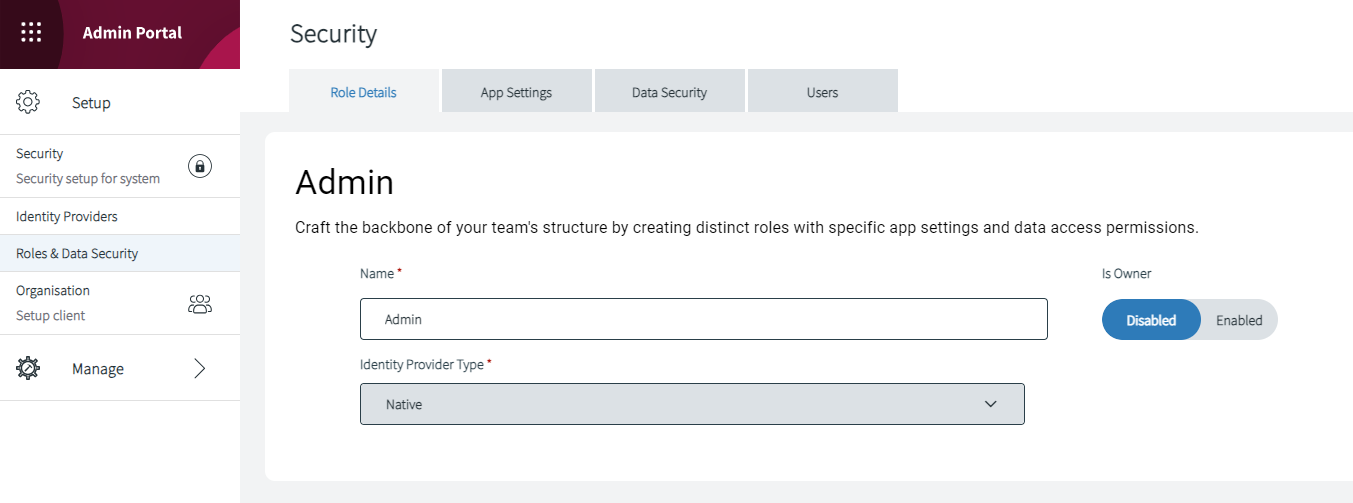
Rollendetails
Rollen werden entsprechend den AAD-Rollen der Organisation erstellt. Wir können auch native Rollen für verschiedene Anforderungen erstellen.
Auf der Registerkarte „Rollendetails“ können Sie:
- Ändern des Rollennamens
- (nicht editierbar) Identitätsanbietertyp
- Aktivieren oder deaktivieren Sie die für diese Rolle gewährte Eigentümerschaft
App-Einstellungen
Die App-Einstellungen legen die Sicherheitsrechte für die Aktionen fest, die ein Benutzer auf der IBSS -Plattform ausführen darf.
Es gibt folgende Abschnitte mit den entsprechenden Einstellungen:
- ROAMER
Weitere Informationen zu den Einstellungen finden Sie hier: Roamer -Sicherheitsrechte - ONELENS360
Weitere Informationen zu den Einstellungen finden Sie hier: OneLens360 Sicherheitsrechte - BIEGEN
Weitere Informationen zu den Einstellungen finden Sie hier: Flex Sicherheitsrechte - ADMINPORTAL
- API
Weitere Informationen zu den Einstellungen finden Sie hier: API-Sicherheitsrechte
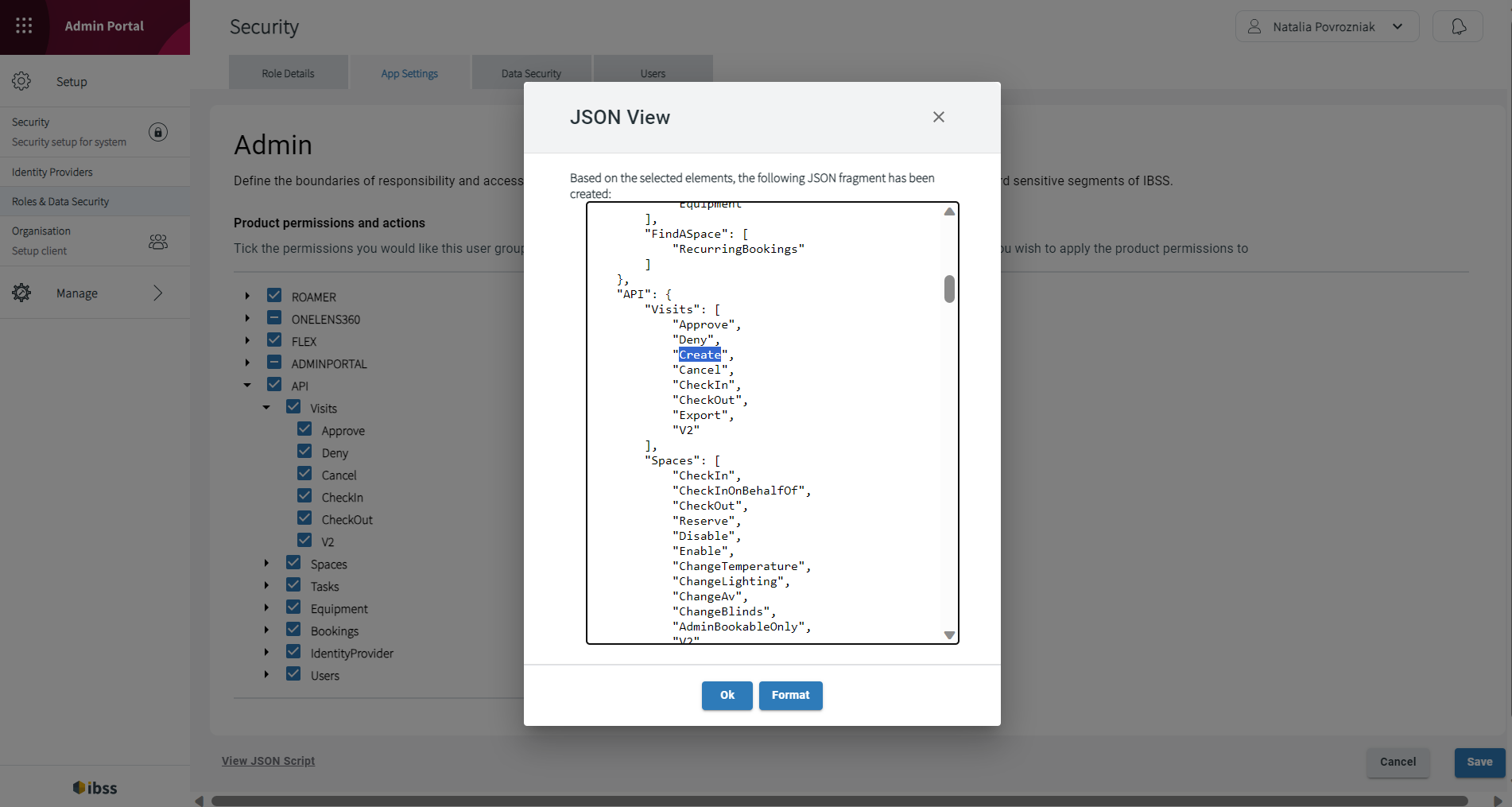
Hinzufügen der Schaltfläche +HINZUFÜGEN für Besucher in Flex
- Fügen Sie im JSON-Skript unter API > Besuche die Zeile „Erstellen“ hinzu.
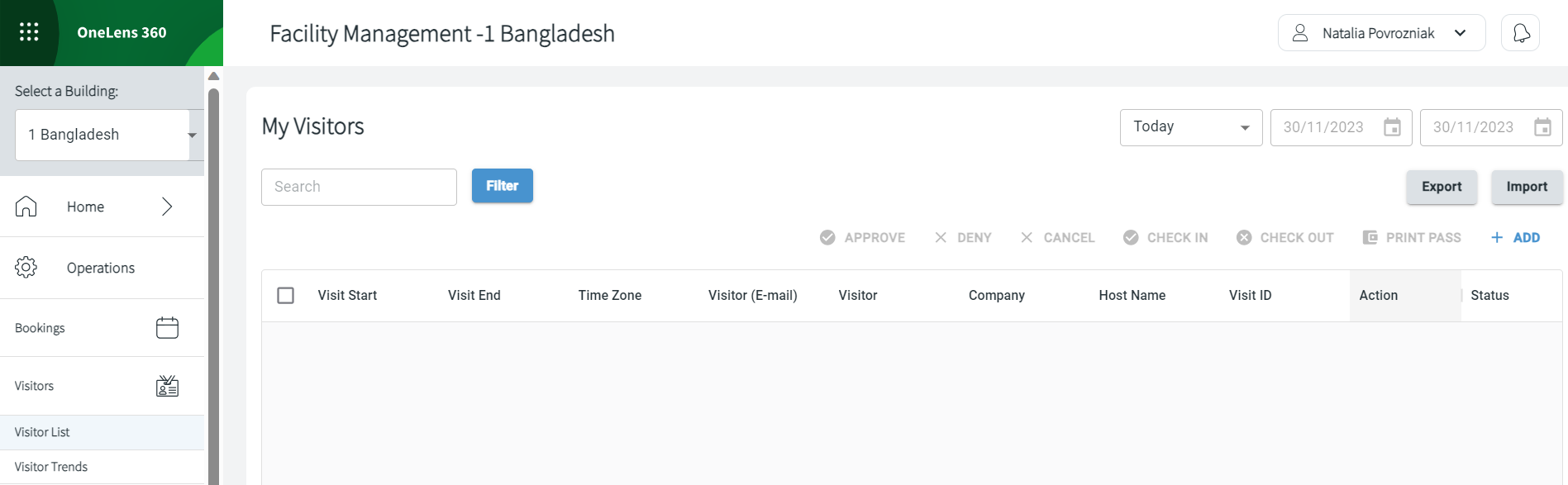
Entfernen der Exportschaltfläche für Buchungsliste, Besucherliste, Aufgaben und Räume in OneLens
Entfernen der Schaltfläche „Exportieren“ für eine Benutzerrolle
Die Schaltfläche „Exportieren“ ist für alle Benutzerrollen in OneLens auf den folgenden Seiten aktiviert:
- Buchungsliste
- Besucherliste
- Aufgaben
- Räume
Hinweis : Um die Deaktivierung der Schaltfläche „Exportieren“ zu beantragen, wenden Sie sich bitte an IBSS Support.
Um die Schaltfläche „Exportieren“ für eine bestimmte Rolle zu deaktivieren, gehen Sie wie folgt vor:
- Gehen Sie im Admin-Portal zu Setup > Rollen und Datensicherheit.
- Wählen Sie eine Rolle aus, für die Sie die Schaltfläche „Exportieren“ deaktivieren möchten.
- Öffnen Sie die Registerkarte „App-Einstellungen“ .
- Klicken Sie unten links auf „JSON-Skript anzeigen“ .
- Entfernen Sie im Popup im Abschnitt ONELENS360 „ Exportieren “.
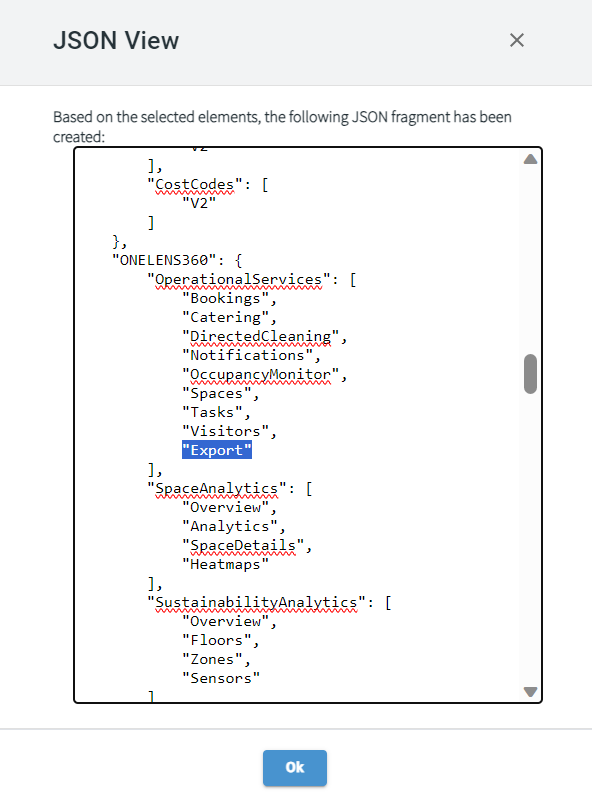
- Klicken Sie auf Ok .
- Klicken Sie auf Speichern , um Ihre Änderungen zu bestätigen.
Jetzt steht Benutzern mit dieser zugewiesenen Rolle die Schaltfläche „Exportieren“ auf den genannten Seiten nicht mehr zur Verfügung.
Datensicherheit
Die Sicherheitsrechte des Datenmodells bestimmen, welche Daten der Benutzer auf der IBSS -Plattform erstellen, lesen, aktualisieren und löschen kann.
Data Model Security
The security model in the IBSS platform has been enhanced to include app security rights as well as data model security rights.
App Security vs Data Model Security
App security rights determine what a user is allowed to do on the IBSS platform whilst data model security rights determines what data the user can create, read, update and delete in the IBSS platform.
Data Model Rights
The IBSS Platform provides Data Model rights on the following functions in a record:
- Create - the ability to create a new record of that type.
- Read - the ability to read a record.
- Update - the ability to modify a record.
- Delete - the ability to remove a record.
- Lock - the ability to lock a record (not used).
- Unlock - the ability to unlock a record (not used).
- Share - the ability to share rights to the record with another entity.

For each of these rights, the following levels can be applied:
- None - no rights.
- Basic - rights apply only to records owned by me.
- Local - rights apply to records which are owned by any role that I belong to.
- Deep - rights apply to records which are owned by any role (or parent role) that I belong to.
- Global rights apply to all records of that type.
Note: To amend Data Model rights, please contact IBSS support.
The following lists the record types to which Data Model security can be applied:
Event Type |
Description [Type] |
|---|---|
| AccessPasses |
✅ new in 2025.01 Stores access pass numbers for Roamer. [Data] |
BookingParties |
Stores data about parties of a booking. [Data] |
| BookingPolicies | Stores data about booking policies. [Data] |
BookingSpaces |
Stores information used for Linked Spaces. [Data] |
Bookings |
Stores booking information. [Data] |
BookingsDailySummary |
Stores daily summary of bookings. [Data] |
BuildingKPIs |
Stores BuildingKPI configuration. [Config]
Used by Roamer. Deprecated, the new endpoint is v2 Shortcuts.
|
| CateringMenuItems | Stores all orderable catering items per building. [Data] |
| CateringMenus | Stores a collection of Catering items per building defined by a from and to date. [Data] |
| CateringOrderPolicies | Stores the pantry/kitchen operating hours and preparation times for catering items per building. [Config] |
| CateringOrders | Stores orders associated to bookings. [Data] |
| CateringRestrictions | Stores common restrictions (dietary and allergen) across an organisation that can be associated with catering items. [Data] |
| CateringSuppliers | Stores a list of suppliers per organisation that may supply catering items. [Data] |
| CateringTemplates | [reserved for future functionality] |
| ConnectorsConfiguration | Stores permissions required for connectors that are deployed as part of the platform. Permissions depend on the type of the connector. |
CostCodes |
Stores Cost Codes information. [Data]
Provides the CRUD rules to the cost codes for CREATE/READ/UPDATE/DELETE.
|
| DataPoints |
✅ new in 2025.01 Stores permissions for sensor data to configure sensors for a building or a space. |
| Delegates | Stores permissions for delegates. |
Devices |
Stores Device configuration. [Config] |
DevicesStatus |
Stores feedback from deployed devices. [Data] |
EnvironmentalFloorData |
Stores summarised environmental data per floor. [Data] |
EnvironmentalSensors |
Stores information about environmental sensors. [Config + Data] |
EnvironmentalZoneDailySummary |
Stores daily summary environmental information. [Data] |
EnvironmentalZoneData |
Stores real-time environmental information. [Data] |
EnvironmentalZoneSummary |
Stores 30 minute summary environmental information. [Data] |
EnvironmentalZones |
Stores environmental zone configuration. [Config] |
Equipment |
Stores equipment information. [Config + Data] |
| ExportRequests |
✅ new in 2025.01 Stores all export requests made by the user. |
| Filters | Stores system filters information. |
| IdentityProviders | Stores identity provider details of the organisation. [Config] |
Nodes |
Stores node hierarchy (Organisation > Floor level). [Config] |
| Notes | Stores rules for visitor notes. |
| NotificationReminders |
✅ new in 2025.01 Creates notification reminders for the building. |
NotificationRules |
Stores notification rules information. [Data] |
Notifications |
Stores generated user notifications and created building announcements. [Data] |
Parameters |
Stores parameter information. [Config + Data] |
ResolversCategories |
Stores link information between resolvers and task categories. [Data] |
ResolversDailySummary |
Stores daily summary by resolver. [Data] |
RoleDataSecurity |
Stores information about what rights each role has. [Data] |
Roles |
Stores role information. [Data] |
| Signage | Stores signage information (Deprecated) |
| Shortcuts |
✅ new in 2025.01 Stores signposts per building. |
SpaceCateringMenu |
Stores catering information. [Config + Data] |
SpaceInformation |
Stores Space Information. [Data] |
SpaceStates |
Stores state information for each Space State. [Config] |
SpaceUtilisationSummary |
Stores live summary data for spaces. [Data] |
SpaceZones |
Stores zone to space associations. [Data] |
Spaces |
Stores spaces information. [Config + Data] |
| SpacesConfiguration |
✅ new in 2025.01 Stores configuration data for the space. |
SpacesDailySummary |
Stores daily summary of space usage. [Data] |
| SpacesMonthlySummary | Stores monthly summary of space usage (Deprecated) |
SpacesSpaceInformation |
Stores link between spaces and space information. [Config] |
SpacesSummary |
Stores 15 minute summary data of spaces. [Data] |
| SpacesWeeklySummary | Stores weekly summary of space usage. (Deprecated) |
SupportedVersions |
Stores supported versions of client apps. [Data] |
| Tag2EventType | Stores permissions to use tags. |
| TagDefinitions | Prerequisite for Tag2EventType. Stores permissions to create tags. Users must have Create, Update, and Delete permissions to be able to work with tags. |
TaskCategories |
Stores Task categories information. [Data] |
TaskStates |
Stores state information for each Task State. [Data] |
TaskTypes |
Stores config information about a task. [Config] |
Tasks |
Stores generated task information. [Data] |
TasksDailySummary |
Stores daily summary of tasks. [Data] |
| TicketedEvents |
✅ new in 2025.01 Stores event data related to a booking. |
UserNotifications |
Stores users to notifications information. [Data] |
UserRoles |
Stores the role association of a user. [Data] |
Users |
Stores user information. [Data] |
| VisitorTypes |
✅ new in 2025.01 Stores visitor types per building. |
Visitors |
Stores visitor information. [Data] |
Visits |
Stores visit information. [Data] |
VisitsDailySummary |
Stores daily summary of visits. [Data] |
| WalletPassConfig |
✅ new in 2025.01 Stores Wallet Pass data per visit ID. |
Für Kostencodes erforderliche Berechtigungen
Permissions required for Cost Codes
Depending on the configuration of your IBSS Platform deployment, cost codes may be available to you to use when booking certain types of spaces.
Cost codes are enabled in Admin Portal.
Note: To enable cost codes for your organisation, please contact IBSS support.
To enable cost codes:
- Go to Security > Roles, and then select the role you wish to enable cost codes for.
- Go to the Data Security tab.
- From here, you can enable Create, Read, Delete, and Update permissions for cost codes.
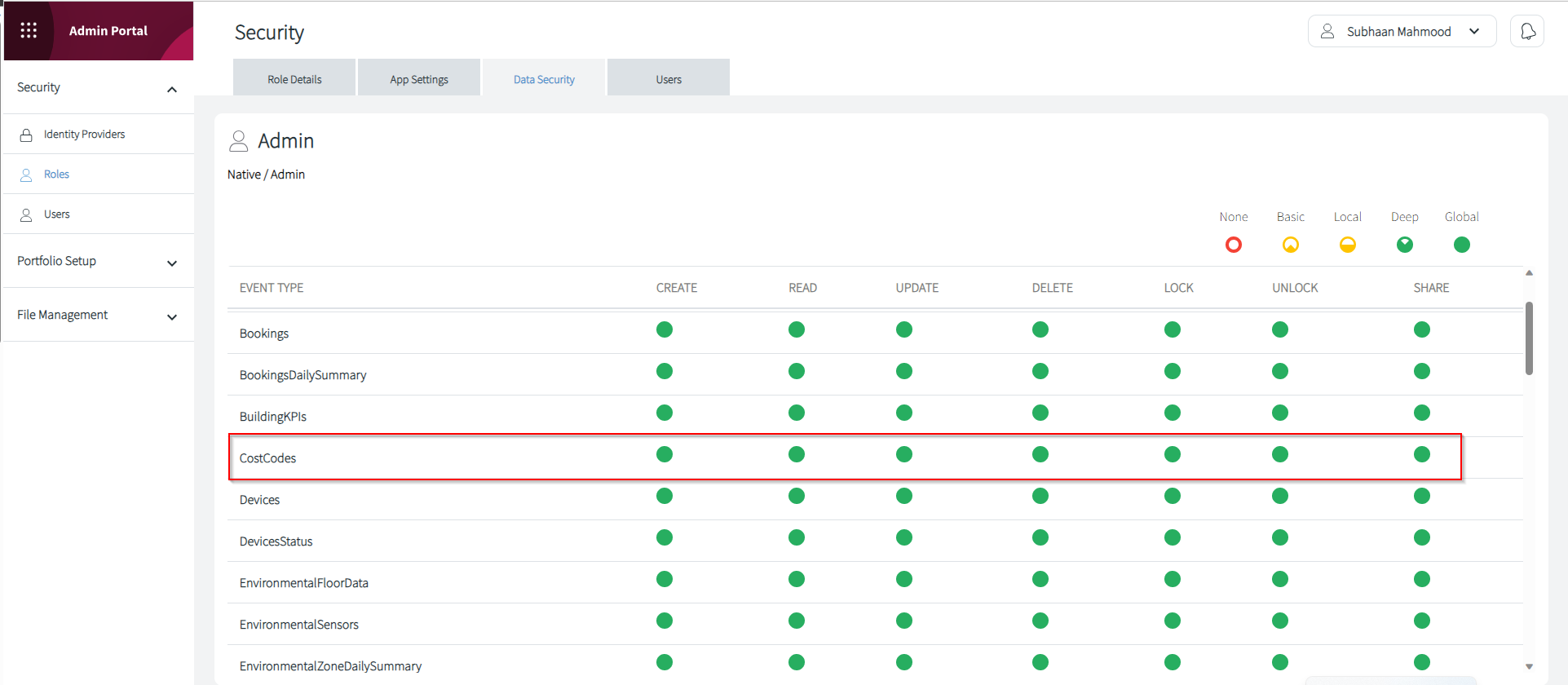
Cost codes, if enabled, are available in Roamer, Flex, and OneLens.
Benutzer
Sie werden durch AAD gesteuert, mit dem sie verknüpft sind, aber Sie können native Benutzer erstellen.