

The Identity Architecture below provides an overview of the Identity connections between the various components of the IBSS Solution and the 3rd Party Identity Provider (IDP).
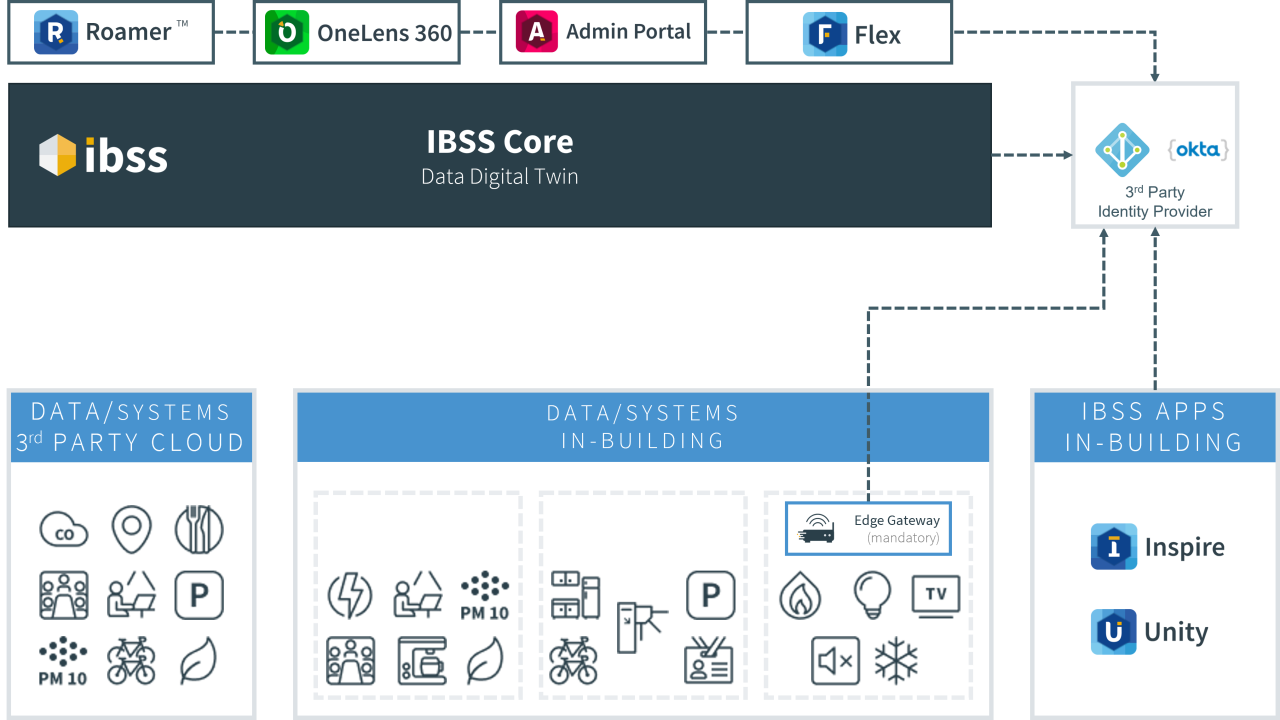
Identity Connections
A typical IBSS deployment has four types of connections to the Identity Provider:
- IBSS Core – Data Digital Twin: will synchronise the users and groups that have access rights to the solution.
- IBSS In-Building Apps: Will validate their logon credentials against the Identity Provider.
- On-Premises Data Systems: If there is an Edge Gateway device providing control functions for the In-Building IBSS Apps, it will synchronise the users and groups that access rights to the local control points.
- IBSS User Apps: Will validate their logon credentials against the Identity Provider.
The IBSS Solution is designed to make use of a 3rd Party Identity Provider to cleanly integrate with the corporate infrastructure. IBSS currently supports the following 3rd Party Identity Providers:
- Microsoft Entra ID
- Microsoft Entra ID B2C
- Okta
Microsoft Entra ID
The IBSS Solution uses the following capabilities from Microsoft Entra ID:
- Users and Roles synchronisation
- Login validation
- SCIM setup
⚠️ Important: To use SCIM setup, create a new Enterprise application first. If this step is not completed and you move on and create an Application Registration, you’re then blocked from going back to Enterprise apps and using SCIM users synchronisation.
⚠️ Important: During users mapping, it's important to change the Source attribute for externalId from the default mailNickname to objectId.
Graph API Permissions
The following are the required Graph API permissions for the IBSS platform to operate
Permission |
Why it's needed |
Where |
|---|---|---|
User.Read.All |
Sync users from Microsoft Entra ID to IBSS. |
Cloud Services |
GroupMember.Read.All |
Sync groups from Microsoft Entra ID to IBSS. |
Cloud Services |
User.Read |
Allow the user to sign in via Microsoft Entra ID. |
Client Apps |
Calendars.ReadWrite (Delegated) |
Allow the app to add calendar entries to the user's calendar. |
Client Apps |
Calendars.ReadWrite (Application) |
Allow the back-end to sync to meeting room calendars and to manage calendar entries for auto-cancellations. |
Cloud Services |
|
DeviceManagementManagedAppsReadWrite (Delegated) |
To use Microsoft Intune app protection (MAM). |

Okta
The IBSS solution supports connection via OpenID Connect (OIDC) to Okta. The IBSS Solution uses the following capabilities from Okta:
- Users and Roles synchronisation
- Login validation
Constraints
Both Microsoft Entra ID and Okta support guest accounts (i.e. accounts that have a different email domain than the 'normal' users) within the scope of their identity provision, however for this to work within IBSS the following constraints must be met
- The email address used must be a standard email address.
- The unique name must only contain alphanumeric (a-zA-Z0-9), period/full-stop (.) and the single @ sign.
- Every email address can only be used once, so if multiple identity providers are used, ensure that a normal account in one Identity Provider is not the guest account in another Identity Provider.
SCIM Constraints
- On-demand provisioning of groups supports updating up to five members at a time. The on-demand provisioning request API can only accept a single group with up to 5 members at a time.
- On-demand provisioning supports provisioning one user at a time through the Microsoft Entra admin center.
- Restoring a previously soft-deleted user in the target tenant with on-demand provisioning isn't supported. If you try to soft-delete a user with on-demand provisioning and then restore the user, it can result in duplicate users.
- On-demand provisioning of roles isn't supported.
- On-demand provisioning supports disabling users that have been unassigned from the application. However, it doesn't support disabling or deleting users that have been disabled or deleted from Microsoft Entra ID. Those users don't appear when you search for a user.
- On-demand provisioning doesn't support nested groups that aren't directly assigned to the application.
- Removing a user group doesn't remove users if they are part of another group. If this was the only group that users were part of, the users will be removed during the next sync cycle.