

The Booking Trends page shows the following:
- All bookings in the form of a bar chart for the two past weeks starting from yesterday. Bookings are shown in colours that represent different statuses:
- No Show
- Cancelled
- Auto Cancelled – after a certain time period that is set in the booking policy
- Completed – after the planned booking time has elapsed
- Active (to be deprecated)
-
Donut charts with bookings that are sorted by:
- Booking Status:
- No Show
- Auto Cancelled
- Cancelled
- Completed
- Check-in Status (transitional state):
- Early Check-in – within a certain time period before the booking that is set in the booking policy
- Late Check-in – depending on the organisational configuration, typically 5 minutes
- Checkout status:
- Completed – this status is activated only after the end of the actual booking, not when the person has checked out
- Booking Status:
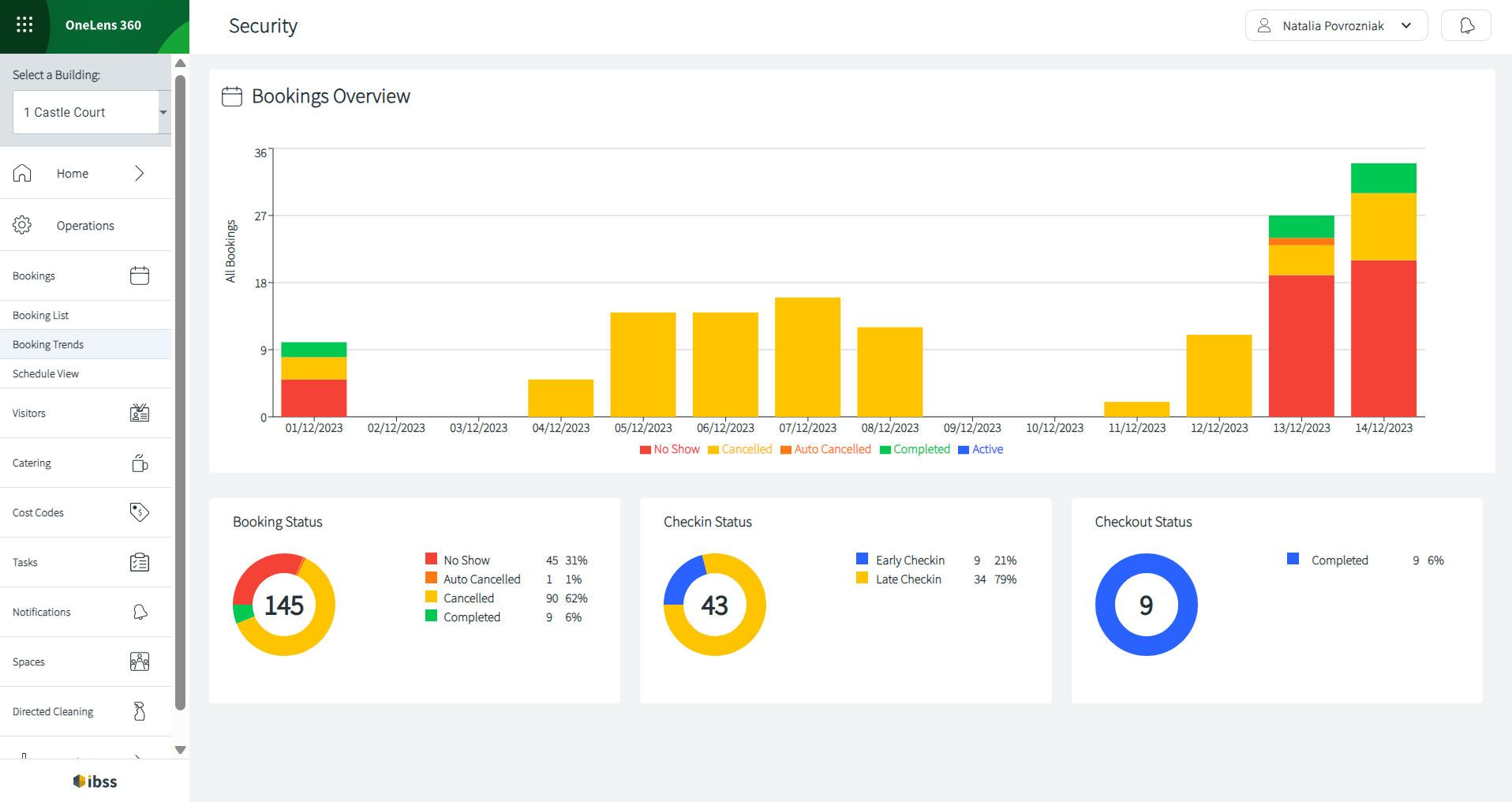
How the charts work
- Hover over one of the bars that represents a day in the upper bar chart to view number of bookings for that day.
- Click one of the bars. The below donut charts will show you details for that day.